
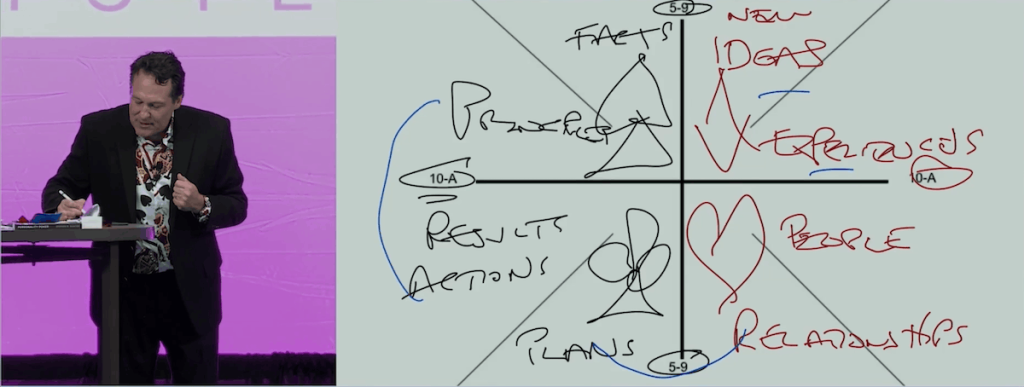
Imagine standing in front of 900 business leaders. You’re explaining a concept, but instead of showing them a finished diagram, you start drawing it. A line appears on the giant screens, followed by another. You circle something important, draw an arrow, and highlight a key relationship. The audience watches the idea take shape in real time.
Now imagine doing all of this while standing in the middle of the audience, looking someone directly in the eyes, and having a conversation with them.
That’s exactly what I do during my keynotes. And my secret weapon is something surprisingly simple: an iPad mini.
But here’s an important point. My iPad isn’t running the presentation or sending video to the projector. My MacBook Pro handles everything, including the slides, music, videos, and animations. It’s connected directly to the venue’s projection system using HDMI, just as it would be for a traditional presentation.
The iPad is simply a wireless remote control for Keynote running on my Mac. The two devices communicate over a private Wi-Fi network that I bring with me. This gives me the flexibility of wireless control without the risks associated with wirelessly transmitting the entire presentation.
I’ve been using this setup for twelve years, and it has fundamentally changed how I interact with audiences. There are two reasons I love it.
One is the ability to draw directly on my slides.
The other is the freedom to completely change my presentation on the fly.
The Power of Drawing in Real Time
There’s something powerful about watching an idea being created rather than simply seeing the finished product.
Research supports this. A 2016 study published in the Journal of Educational Psychology by Logan Fiorella and Richard Mayer found that, under certain conditions, people who watched an instructor draw diagrams performed better on learning tests than those who saw completed diagrams.
One explanation is that watching a diagram develop directs attention and allows people to process information as it unfolds. Rather than trying to absorb an entire framework at once, the audience follows the thinking behind it, one element at a time.
But I believe something else happens during a live presentation. When I show a polished, prebuilt diagram, the audience knows it was created before they arrived. When I draw that same diagram in real time, it feels like we’re creating something together. It’s happening right now, in this room, with these people. The experience becomes more personal.
For my Personality Poker keynote, this is a game-changer. Rather than simply showing a completed framework, I can build on it as I explain the concepts. One suit at a time. One combination at a time.
Using an Apple Pencil, I can circle personality traits, connect ideas, draw arrows, or emphasize something someone in the audience just said.
Everything I draw appears immediately on the giant screens. And because I’m using an iPad mini, I’m not tethered to a lectern or computer. I can walk into the audience, engage someone in conversation, and draw while maintaining eye contact. It’s like having a giant interactive whiteboard that follows me wherever I go.
The Freedom to Change My Presentation on the Fly
The second major advantage is flexibility.
Most speakers use a traditional clicker to advance through a predetermined sequence of slides. That works well enough until something unexpected happens. What if you need to skip five slides because your timeslot was cut at the last minute from 60 minutes to 45 minutes? What if someone asks a question about a topic you hadn’t planned to cover? Or what if the event organizer suddenly changes the amount of time you have available and asks you to go longer?
With a traditional clicker, you might find yourself rapidly advancing through slides while the audience watches. My iPad eliminates that problem.
I typically have 50 to 100 slides loaded into Keynote, more than I expect to use. On my iPad, I can see thumbnails of every slide. I simply scroll through them, tap the slide I want, and instantly jump there. The audience never sees me navigating.
This allows me to adjust the presentation based on what’s happening in the room. If the audience is particularly interested in a topic, I can go deeper. If someone asks a question, I can jump directly to a relevant slide. If we’re running short on time, I can skip entire sections without anyone noticing.
And if the client wants me to go longer, I’m ready.
That happened recently. I was originally scheduled to deliver a 75-minute presentation. At the last minute, the client asked if I could extend it to 120 minutes. Fortunately, I already had additional material loaded and could expand the presentation without having to redesign anything.
Or one time, I realized at the last minute that there was a more relevant presentation I should give rather than the one I had prepared. I was able to shift direction without ever touching my MacBook Pro, which was already connected.
At a recent event, while listening to the speakers before me, I realized I had a story that would perfectly reinforce their message. Although I hadn’t planned to share it, the relevant slides were already in my deck. I was able to incorporate the story seamlessly, making my presentation more relevant to what the audience had just heard.
It’s like having a library of content at my fingertips rather than a fixed script. This is particularly valuable during Q&A sessions, when I can access slides that address questions I might not have anticipated.
How the Technology Works
The setup is surprisingly simple, but there are a few things I’ve learned over the years that make it more reliable.
I use Apple’s built-in Keynote Remote functionality to connect my iPad mini to Keynote running on my MacBook Pro. I configure the iPad to display the current slide, the upcoming slide, and a scrollable list of thumbnails that allows me to jump anywhere in the presentation.
Both devices connect to a private Wi-Fi network using a router that I bring to every event. This is important because I don’t want to rely on a hotel’s or conference center’s Wi-Fi network to control my presentation.
For larger venues, I use a router with a wireless repeater that extends the range. This allows me to move freely around the room, even when the Mac is positioned far from the stage. Ideally, I prefer having the HDMI connection somewhere near the front of the room, although it doesn’t need to be directly onstage.
When I need internet access, I use a portable travel router that can connect to the venue’s Wi-Fi while maintaining the local connection between my Mac and iPad.
This is particularly useful when I’m using Full Deck IQ, a tool I’ve developed to help organizations understand the personality dynamics of their teams. Audience members participate using their phones, and I can display their collective results in real time. Imagine hundreds of leaders participating in an activity, seeing their results appear on the screens, and then exploring what those results mean together.
Another benefit of this configuration is reliability. Since the Mac is running the presentation and connected directly to the projector, a temporary loss of the iPad’s wireless connection doesn’t interrupt the video signal. The presentation remains on the screen, and I can always control it directly from the Mac or use a traditional clicker as a backup.
Of course, I test everything before the audience arrives. The last thing I want is for technology to become a distraction during a keynote.
Making Presentations More Human
For me, the biggest benefit of this setup has nothing to do with the equipment itself. It’s about changing the relationship between the speaker and the audience.
Instead of delivering a rigid, predetermined presentation, I can respond to what’s happening in the moment. Instead of displaying finished diagrams, I can create them with the audience. Instead of standing onstage clicking through slides, I can walk into the room and have conversations.
The technology becomes almost invisible, allowing the experience to become more personal, spontaneous, and engaging.
I often say that the best presentations aren’t really presentations. They’re conversations. And the more we can make audiences feel like they’re part of creating the experience, the more meaningful that experience becomes.
My iPad mini isn’t just a better clicker. It’s a tool that helps me turn a presentation into a conversation.
And once you experience that freedom, it’s hard to go back.